
Installing Garmin mobile XT into Nokia E71 and 6110
after a long and extensive search over the internet for a suitable GPS application that provides turn-by-turn navigation, i've finally settled with Garmin Mobile XT, in order for it to work you'll need a phone with a built in GPS, or at least a stand-alone bluetooth GPS receiver.
it should work with almost any GPS enabled nokia, and with the latest GPS-enabled smartphones and Palm Treo, Samsung Blackjack, Motorola Q, T-Mobile Dash and more.
WARNING: first off all please back up all you're phone data, and memory card before you proceed any further, i had to learn the hard way.

Here’s how to install Garmin Mobile XT on your Nokia:
1. Download to your computer the Garmin Mobile XT for Symbian S60 3rd Edition, Ver. 5.00.10 from this link.
2. Download to your computer Garmin Mobile XT Free Basemap, Ver. 4.xx.xx from this link.
3. Download to your computer Garmin Mobile XT Support Files, Ver. 4.xx.xx from this link.
4. Download GM-MySInMXT.exe from this link. (these are Malaysia and Singapore maps set, you have to be registered before you could access the site) (or you could alternatively search for other maps)
5. Connect your Nokia (via memory storage) or memory disk to your computer and make sure it’s detected by your computer. i find it more convenient to connect it through a memory card reader.
6. Now, run the recently downloaded files on the computer, one after another (just by double clicking), in this order:
- v4.xx.xxx Support File,
- v4.xx.xxx Basemap File
- GMXT v5.00.10
- Garmin Mobile XT for Symbian S60
When prompted to choose storage space, always choose the phone’s memory (or memory card).
7. Disconnect phone memory from computer. It’s time to configure Garmin on your phone. Go to your phone’s File Manager >Garmin >Applications >Symbian >RES >GarminMobileXT.sis and install the .sis
If you can’t find GarminMobileXT.sis, check the root directory, it should be there. Install the .sis as per normal. (if still not found just search in the folder)
8. After that, in your phone go to Applications> run Garmin Mobile XT. It won’t connect to GPS satelite yet, so just ignore it.
9. You should have received your device unlock code from the manufacturer of Garmin, however if you haven’t, there are instructions on the Internet to guide you on how to get yours ;)
10. Copy the device unlock code and paste it in a notepad, then save the file as SW.UNL
11. Reconnect your phone/memory to your computer.
12. Copy the SW.UNL file into this phone directory
13. Then, run GM-MySInMXT.exe, and copy gmapsupp.img into
14. Disconnect your phone from your computer.
15. Go to Applications >Garmin Mobile XT >Settings >System >Remote GPS >Select ‘Use Attached/Built-in GPS’ >Enable and it’s all done.
16. Wait for satellite signal to strengthen and then you can start navigating around various places with confidence!
NOTES:
>this method was installed successfully on Nokia 6110 navigator and also Nokia E71.
>Garmin Mobile XT was preferred as there's no charge for viewing the maps once you download them into your phone you'll have FREE navigation, or at least for Malaysia.
>i tried to install Middle East maps as well, but you'll need to find the maps and download them following the same method.
Disclaimer: I'm not responsible for any damages to your phone or any loss of data during the installation, I'm only sharing my experience with you, so please use it responsibly.

you're own photographer
sony unveils party shot, an automatic photographer.
Sony has announced the Party-shot personal photographer, an automated photo-taking cradle. The device uses the DSC-WX1 and DSC-TX1's face- and smile detection functions to detect photo opportunities in social environments. The Party-shot sits on a table or tripod and tilts and pans to locate and follow potential subjects. It will also recompose its shots based on the rule-of-thirds.

Key Features:
- Automatic
Snaps pictures at an event - automatically. - Intelligent
Intelligently searches and tilts to follow subjects and take photos. - Dual Shooting Modes
Smile ShutterTM technology automatically detects smiles and Face Detection technology recognizes faces to take photos at the right moment. - Composition
Intelligent composition uses the rule of thirds to compose great shots. - Motion Detection
Motion detection seeks out movement to take photos at the right moment. - Customize
With one touch of the Menu button, you can set the Rotation Angle, Shooting Frequency, and Flash. - Flexible Power
Power up your Party-shot with either two AA alkaline batteries, or with the AC adaptor (AC-LS5 or ACS5K), sold separately and not included.
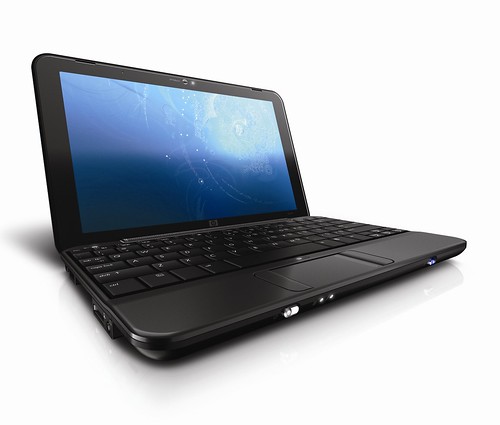
HP Mini 1001TU
The HP Mini 2133 was one of the most stylish not-quite-netbooks we saw last year. It was one of the few that looked like a real notebook, but at the time we bemoaned the inclusion of Vista.
So it’s pleasing to note that the new Mini includes XP Home as the installed operating system. Microsoft’s XP licensing deal means that as a result the RAM in the Mini 1001TU is reduced to 1GB, rather than the 2133’s 2GB, but XP with 1GB performs better than Vista with 2GB, as our recent RAM performance tests showed.
While we benchmark all the netbooks and notebooks that come through our labs, we’ve found amazing consistency for the Atom N270 processor. Even so, the HP Mini rates on the higher side of performance.
It’s score of 0.41 is better than the other nbetbooks we’ve seen bearing this processor – The Eee PC 901 scored .39, for example, and the Wind 0.38. But it’s not in performance that the HP Mini stands out.
Instead, it’s style and usability where HP has focused its efforts. The lid has a silver spiraling pattern across the piano black surface, making it the most attractive netbook we’ve seen.
The Mini-note 2133 had a beautifully stylish silver keyboard, and the only way in which the 1000 is inferior is in colour – the keys are ... [Read full story]

Zelco Outi Bone-Conducting Headphones
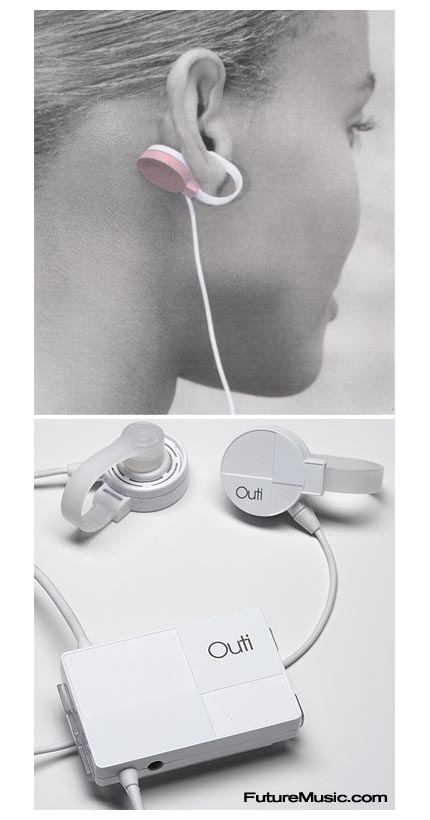
These new and a bit strange headphones are actually quite cool in the way they function and especially the sound quality they provide. Outi earphones clip comfortably and securely outside the ears, providing comfortable and quite nice new look and feel. The headphones work by transmitting vibrations through the skin and cartilage (bone-conducting technology), they create a dynamic new sensual, surround sound that doesn’t just let you watch a movie or listen to your favorite music on the go, it lets you be a part of it. And because these headphones are not inserted into the ear, they avoid damaging the listener’s hearing as past generations of earphones have done…
Outi earphones plug into any MP3, iPod, portable CD and DVD player, most cell phones, gaming systems, radios or any other audio/visual device with a standard 3.5mm jack. The kit includes: Outi amplifier with 4-step switch (off/low/medium/high) to control vibration output, a clip to attach amplifier to clothing or bag/backpack, USB cable for charging, AC adapter and a storage pouch. It takes about an hour and a half to fully charge the built-in lithium-ion battery inside the headphones. When fully charged these headphones will provide 6-8 hours of continuous listening pleasure…
You can get the Zelco Outi Bone-Conducting headphones for $99.99
- To order these high-tech bone-conducting headphones…
FiiO E5 Portable Headphones Amplifier

The Fiio E5 portable headphone amplifier is probably the world’s smallest headphone amplifier that is designed to improve not only the volume, but also the sound quality of almost any digital audio player such as a MP3 or MP4 Player, Mobile Phone, Laptop, or just about any other portable music device. It is an upgraded model of the Fiio E3 Headphone Amplifier which is already very popular around the world because of it’s great results and very affordable price. And the best of all is that the new E5 not only retains all the features of the E3, but also manages to improve on all the drawbacks that the previous model had. So if you want to use a higher quality headphones with your portable music device than the ones you got it with you probably have to check out the Fiio E5 and the benefits that this portable and inexpensive device can provide in order to boost the volume and improve the bass performance…
The Fiio E5 portable headphones amplifier comes in a very small case that has a clip on it’s back so you can easily... [ Read the rest of the story ]
