
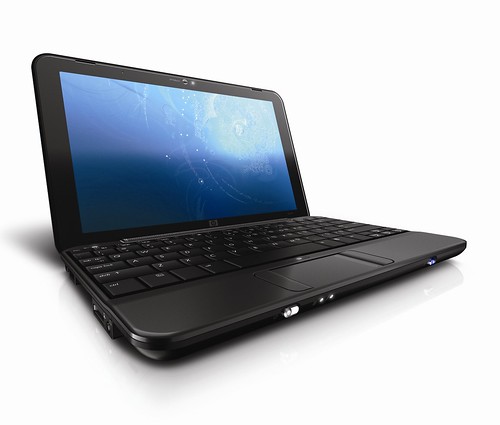
HP Mini 1001TU
The HP Mini 2133 was one of the most stylish not-quite-netbooks we saw last year. It was one of the few that looked like a real notebook, but at the time we bemoaned the inclusion of Vista.
So it’s pleasing to note that the new Mini includes XP Home as the installed operating system. Microsoft’s XP licensing deal means that as a result the RAM in the Mini 1001TU is reduced to 1GB, rather than the 2133’s 2GB, but XP with 1GB performs better than Vista with 2GB, as our recent RAM performance tests showed.
While we benchmark all the netbooks and notebooks that come through our labs, we’ve found amazing consistency for the Atom N270 processor. Even so, the HP Mini rates on the higher side of performance.
It’s score of 0.41 is better than the other nbetbooks we’ve seen bearing this processor – The Eee PC 901 scored .39, for example, and the Wind 0.38. But it’s not in performance that the HP Mini stands out.
Instead, it’s style and usability where HP has focused its efforts. The lid has a silver spiraling pattern across the piano black surface, making it the most attractive netbook we’ve seen.
The Mini-note 2133 had a beautifully stylish silver keyboard, and the only way in which the 1000 is inferior is in colour – the keys are ... [Read full story]


Microsoft to Replace Vista in Late 2009
Microsoft has just released some footage of a preview of Microsoft Windows 7. From the looks of it it looks like Vista mated with a MS Surface Table and was installed on a laptop. Is this touch screen toy the answer to our Vista woes or is it just more unnecessary features that will suck our system resources away from more productive programs? We will see soon... Until then check out the video. Just a note, the video has no sound until the last 15 seconds. This is not an error it is the way it was the way it was made.
source [TheCheapGeek]
Top 10 Gadgets by TIME Magazine, #1
#10. Belkin N1 Vision Wi-Fi Route:
Though the new "N" wi-fi standard, which carries data signals faster and farther than its predecessor "G," isn't expected to be officially ratified until next year, it's far enough along that you can buy certified N products with confidence that they will work with your computers and other hardware. Belkin's audaciously designed N1 Vision router stands vertical and reports on network activity in your house so you can see if your kid is downloading video games when he should be doing his homework. It is designed to configure itself the first time you connect it to your cable modem or DSL, and computers still using older "G" adapters will still be able to connect.
#9. Iomega eGo Portable Hard Drive:
Who knew file storage could be so chic? The 160 GB eGo has enough room to hold up to 640,000 digital photos, 2,900 hours of music or 240 hours of video (depending, of course, on the compression rate). A new dual-interface version works over USB or FireWire and comes with both types of cords. If you accidentally knock the eGo off your desk, the shock-absorbing case will protect the important documents and precious media stored inside.
#8. FlyTech Dragonfly
WowWee's flying insect soars, dive-bombs, hovers and glides using authentic flapping-wing action, which makes it the first commercially available toy ornithopter. It's lightweight (about 1 oz.) yet sturdy, and sports a 16-in. wingspan. The two-channel radio remote lets you control wing speed and tail rotor speed and doubles as a charging base (a 20-min. recharge gives you about 6 min. of flying time). The kids will love it — if you can bear to let them have it for a while.
#7. Toshiba Portégé R500-S5004
This ultra thin-and-light notebook is a dream machine for road warriors. It runs on an Intel Core 2 Duo processor and offers 2 GB of RAM, an integrated DVD burner and graphics card and built-in wireless capability (both wi-fi and Bluetooth). The 12.1-in. widescreen LED-backlit display is super slim and displays in high-definition (1280 x 820 pixels). With the S5004 model you get a solid-state hard drive, which means no fragile spinning parts, so the machine is less likely to suffer damage if dropped or bumped. Total weight: 2.4 lbs.
#6. Samsung P2
The slim and sexy P2 sounds terrific and plays a variety of music file formats: MP3, WMA and songs from subscription services like Rhapsody and Yahoo Music. The pretty 3-in. screen has touch controls for viewing photos and watching videos, which are displayed at a DVD-quality rate of 30 frames per second. The device also works with BlueTooth headsets and speakers, and soon you will be able to receive forwarded calls from a BlueTooth cell phone. (You'll have to download what's called a firmware upgrade from the Samsung website, but don't worry, it's not as difficult as it sounds.) Comes with 4 GB of memory for $200, or 8 GB for $250.
#5. Sony Handycam HDR-CX7
The CX7 records rich high-definition footage straight to a flash memory card (Sony's Memory Stick PRO Duo), so it feels light and compact in your palm, and the 2.7-in. LCD screen features touch controls for set up and playback. Should you get the shakes while shooting, the CX7 has the ability to stabilize the image (using optics, which is more effective than a digital correction) and smooth out the action. A built-in HDMI port lets you connect the camera to an HDTV and watch your home movies in all their high-def glory.
#4. Palm Centro
Do you secretly covet your friend's smart phone while dismissing it as way overpriced? The new Palm Centro provides an opportunity to get all the essential smart-phone features without breaking the bank. This light and bright device supports Web surfing, emailing, instant messaging and text messaging, and sports a 1.3-megapixel camera and a touch screen that works best with a stylus. A mobile version of Google Maps comes preloaded. The qwerty keypad is seriously small, but the bubble-like tactile design of the individual keys makes them easier targets.
#3. Netgear SPH200W Wi-Fi Skype Phone
This cordless wi-fi phone comes with Skype software already built in, so you can log in to an existing account and start making cheap Internet calls immediately. If you've never used Skype before, do not fear: It takes a few moments to create a new account and you can do it right from the phone's keypad. (The first 10 minutes are free; after that, you'll want to visit Skype.com from your computer to sign up for a service plan with a credit card.) The phone will also work at most public hotspots (including T-Mobile's) so if you have lots of friends overseas, you may not want to leave home without it.
#2. Nikon Coolpix S51c
Have you ever maxed out your digital camera's memory card midway through a vacation? The 8-megapixel Nikon Coolpix S51c point-and-shoot is tricked out with built-in wireless capability, so you can email your images or beam them directly from the camera to your Flickr account or to Nikon's own online photo bank. It's also got a 3x zoom and a roomy 3-in. LCD screen — and it comes in black.
#1. Apple iPhone
The iPhone changed the way we think about how mobile media devices should look, feel and perform. The design is exceptional inside and out: It's got a slick glass-and-stainless steel case and an elegant touch screen loaded with eye candy. It's an iPod and a 2-megapixel camera. Images and video clips display vertically or horizontally — they reorient themselves depending on how you hold the thing. When the phone detects a wireless network within range — your own home wi-fi set up or somebody else's — it lets you tap once to connect, and then proceed with your Web surfing, Google mapping, emailing and other activities that can otherwise be painfully slow over AT&T's cellular network — the only one, unfortunately, that carries iPhone calls.


Windows XP RAM upgrade using a Flash/pen drive
 windows vista came with a few interestin things that i could mention, and having the feature of being able to use your pen/flash drive as a RAM to speed up your windows vista with Readyboost is just astonishing isn't it?
it's much cheaper compared to physically upgrading your RAM, especially if you're using laptops or DDR1 for example which im using, in fact pen drives are quite affordable nowadays.
on the other hand eBoostr speeds up your PC and improves application responsiveness by using flash memory and free RAM as an extra layer of performance-boosting cache for your PC. Use up to four inexpensive flash devices to speed up your system. Add more speed to your PC without any hardware upgrade!
the trial version will give you 4 hours of full functionality each time you boot up, and the full version is available at around $29
[download eBoostr]
30 Year Continuous Power Laptop Battery
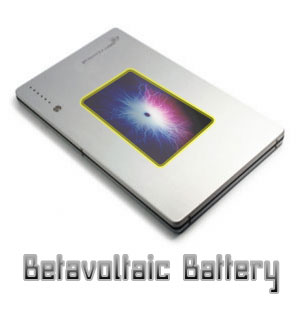
this's a report from the next energy news, it reads as follow..
Your next laptop could have a continuous power battery that lasts for 30 years without a single recharge thanks to work being funded by the U.S. Air Force Research Laboratory. The breakthrough betavoltaic power cells are constructed from semiconductors and use radioisotopes as the energy source. As the radioactive material decays it emits beta particles that transform into electric power capable of fueling an electrical device like a laptop for years.
[read more]
MacBook Air, what you see isn't exactly what you get.

Its not exactly the ultimate laptop everybody's expecting, Apple call it the thinnest (available in market today) but not the thinnest of all time. An absolutely revolutionary to make a the new MacBook Air fits into the a paper file with an extraordinary design and engineering.
well, it might be the choice for travelerrs who want minumum weight, least connectivity and resonable performance. so what doesn this newally invested laptop has most others don't
- it comes with a light sensor that respose to the room light and adjust the screen brightness accordingly.
- a smarter touch-pad, reasonably large enough for new gestures. ordinary touch pads let use two fingers t scroll up and down, but the MacBook Air allows the use of three fingers for go forward and backward in a web browser for instance. the new touch pad is in fact developed from the iPhone with the iPhone's Multi Touch Chip.
so what's missing in the MacBook Air
- Connection, Apple went far by removing most connection port, and limtting it to only a standard speaker/headphone minijack, a USB 2.0 port, and a micro-DVI port. and thats all. It would be a trouble for multi USB ports users, so you'll have to use a bluetooth mouse and Wi-Fi internet.
- No Optical Drive, so how to watch movies or Install software? Apple assumes that you have another PC at home and able to use the network for that.
- A user replaceable battery, which for some users carrying an extra battery is essential for traveling incase one ran out.

What about the Price?
Although you can configure some additional options, the base 1.6GHz model costs $1,799, $300 more than the top-of-the-line 2.2 GHz black MacBook, and $200 less than the low-end 2.2GHz 15-inch MacBook Pro. Or you can go wild and configure yourself an ultimate MacBook Air for $3,098—almost $300 more than the 2.8GHz 8-core Mac Pro. (Most of that extra cost comes from one particular hard drive option—more on that shortly).
